A little light in the deep — custom icons for 4D files & folders
Down in the twilight zone, every glimmer helps you find your way. A 4D project is a school of
look-alike files — .4DProject, .4DCatalog, .4DForm, .4DSettings, .4dm, .4DD — and
with generic icons they all blur into the same grey shape. Two Material Icon extensions
fix that: one lights up your editor, the other lights up the repository in your browser. Set
them up once and you can read a 4D project at a glance.
Here’s the result in VS Code:
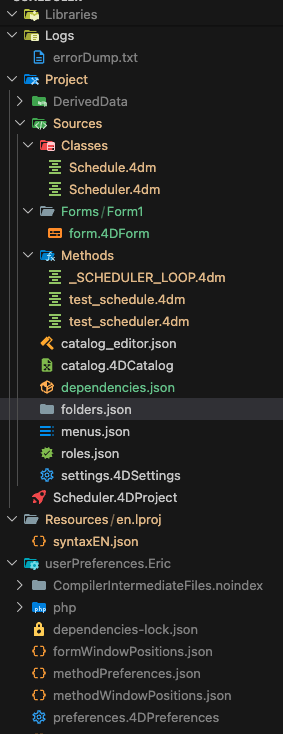
🟦 VS Code — Material Icon Theme
Install Material Icon Theme
by Philipp Kief, then drop these associations into your settings.json:
"material-icon-theme.files.associations": {
    "*.4DCatalog": "table",
    "*.4DD": "database",
    "*.4DForm": "subtitles",
    "*.4DPreferences": "settings",
    "*.4DProject": "rocket",
    "*.4DSettings": "settings",
    "*.4dm": "credits",
    "*.dylib": "dll",
    "*.Match": "database",
    "catalog_editor.json": "renovate",
    "dependencies-lock.json": "lock",
    "dependencies.json": "parcel",
    "folders.json": "folder",
    "menus.json": "toc",
    "roles.json": "verified"
},
"material-icon-theme.folders.associations": {
    "Classes": "class",
    "Data": "database",
    "DerivedData": "buildkite",
    "Forms": "desktop",
    "Methods": "functions",
    "userPreferences.YourName": "config"
}
⚠️ One field to personalize. The user-preferences folder is named after your 4D account —
userPreferences.YourName(mine readsuserPreferences.Eric). VS Code matches folder associations by their exact name, so replaceYourNamewith yours. File associations, on the other hand, are globs (*.4DProject), so they just work.
🟧 GitHub / Chrome — Material Icons for GitHub
Want the same icons while browsing the repo on github.com? Install Material Icons for GitHub.
Its settings live on a hidden options page. Open it, launch the DevTools console (right-click → Inspect → Console), paste the config below, and press Enter:
chrome-extension://bggfcpfjbdkhfhfmkjpbhnkhnpjjeomc/options.html
var config = {
    "bitbucket.org:extEnabled": false,
    "codeberg.org:extEnabled": false,
    "default:fileIconBindings": {
        "*.4DCatalog": "database",
        "*.4DD": "database",
        "*.4DForm": "subtitles",
        "*.4DIndx": "database",
        "*.4DPreferences": "settings",
        "*.4DProject": "rocket",
        "*.4DSettings": "settings",
        "*.4dm": "credits",
        "*.dylib": "dll",
        "catalog_editor.json": "renovate",
        "dependencies-lock.json": "lock",
        "dependencies.json": "parcel",
        "menus.json": "toc",
        "roles.json": "verified"
    },
    "default:folderIconBindings": {
        "Classes": "class",
        "Data": "database",
        "DerivedData": "buildkite",
        "Forms": "desktop",
        "Methods": "functions",
        "userPreference.*": "config"
    },
    "dev.azure.com:fileIconBindings": false,
    "dev.azure.com:folderIconBindings": false,
    "gitea.com:extEnabled": false,
    "gitee.com:extEnabled": false,
    "github.com:extEnabled": true,
    "gitlab.com:extEnabled": false,
    "sourceforge.net:extEnabled": false,
    "tangled.org:extEnabled": false,
    "visualstudio.com:extEnabled": false
};
chrome.storage.sync.set(config);
💡 This extension accepts a wildcard for the user-preferences folder (
userPreference.*), so it adapts to any account name automatically — no hand-editing needed. TheextEnabledflags keep the icons on github.com only and quiet everywhere else; flip them if you live on GitLab, Gitea, or Codeberg too.
Why bother
Scanning a 4D project becomes muscle memory: 🚀 is the project file, the database files cluster under a database icon, forms get subtitles, methods get a functions glyph. Less squinting, more shipping — a small beam of light in the deep.
Browse the full 4D component catalog on the home page, and more AI / Swift / 4D notes over on phimage.github.io.